New ways to configure assessment access
We're excited to announce redesigned assessment access controls in PrairieLearn! They introduce a simpler mental model and a full-featured in-browser editor in the existing Access tab, and can still be configured via JSON. Existing allowAccess rules continue to work, so you can migrate whenever you're ready.
Edit access settings in the UI
Configuring access for an assessment no longer requires hand-crafting complex data structures in JSON. Assessment availability, deadlines, credit, time limits, passwords, PrairieTest links, after-completion visibility, and more can now be configured directly in your browser on the redesigned Access tab for each assessment.
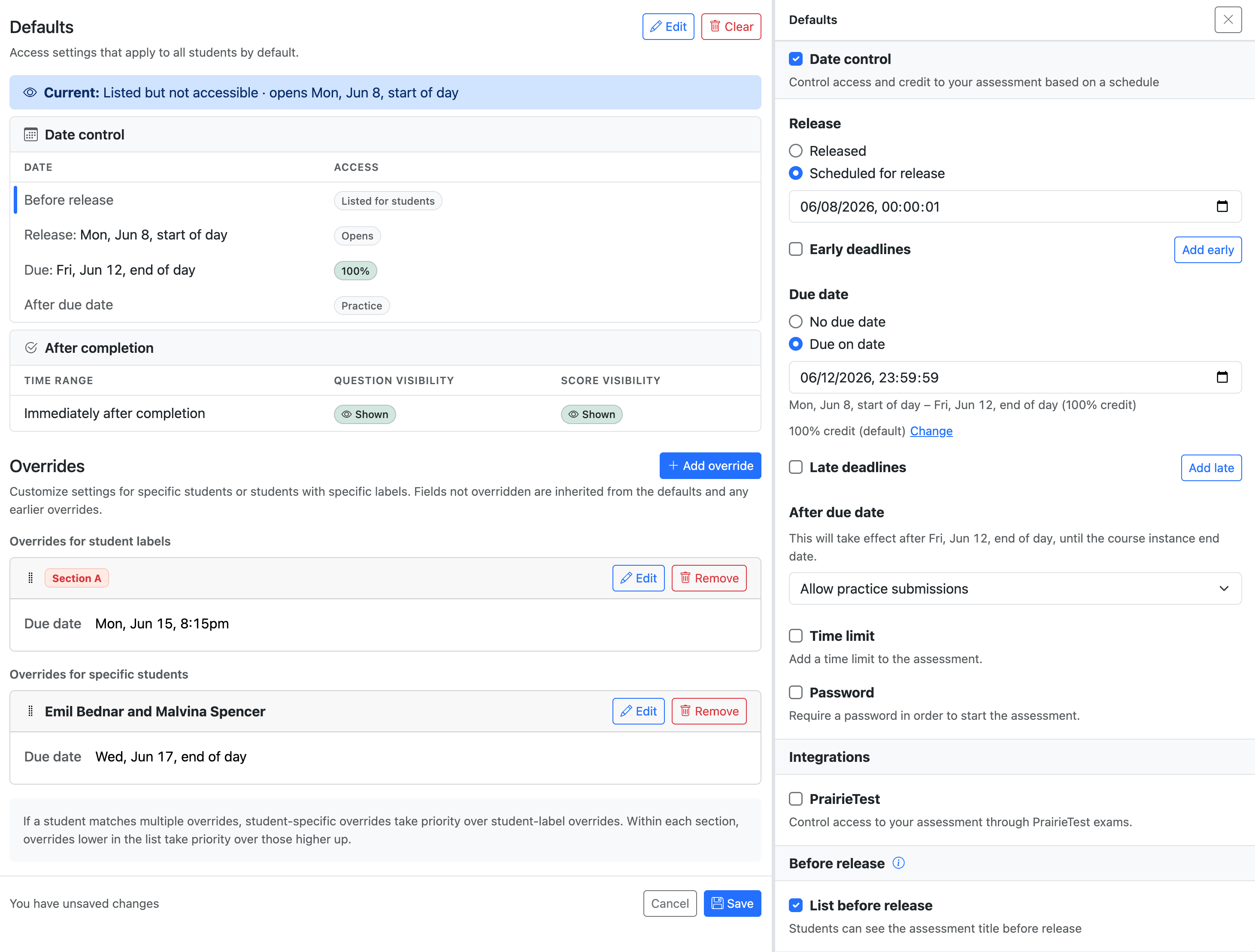
Dates, deadlines, and credit
The biggest change for date-based access is that availability and credit are now modeled as a single timeline. Instead of writing overlapping allowAccess rules and reasoning through which one applies, you configure a release date, an optional due date, optional early and late deadlines, and whether submissions are allowed after the last deadline.
You can also decide whether students should see the assessment title before release, even though they can't open it yet.
For example, a homework assignment can be worth 110% until an early deadline, 100% until the due date, 80% for a late-submission window, and then remain open for practice at 0%. The editor presents that as one ordered set of deadlines, making it much easier to see what students will experience.
Time limits, passwords, and after-completion visibility
For timed assessments, you can give each student a configured amount of working time within the assessment's submission window. You can also require a password before students start or continue working. After the assessment is complete, you can control when students can see questions and scores, including optionally revealing them on a future date.
PrairieTest exams
The editor makes it easy to link PrairieLearn assessments with PrairieTest exams. When a student is checked in to an active matching PrairieTest reservation, PrairieTest grants access and controls the live exam window, time limit, and exam access controls. To make an assessment available only through PrairieTest, leave date control disabled. If students should not review questions or scores outside the reservation, set the top-level Question visibility and Score visibility to hidden.
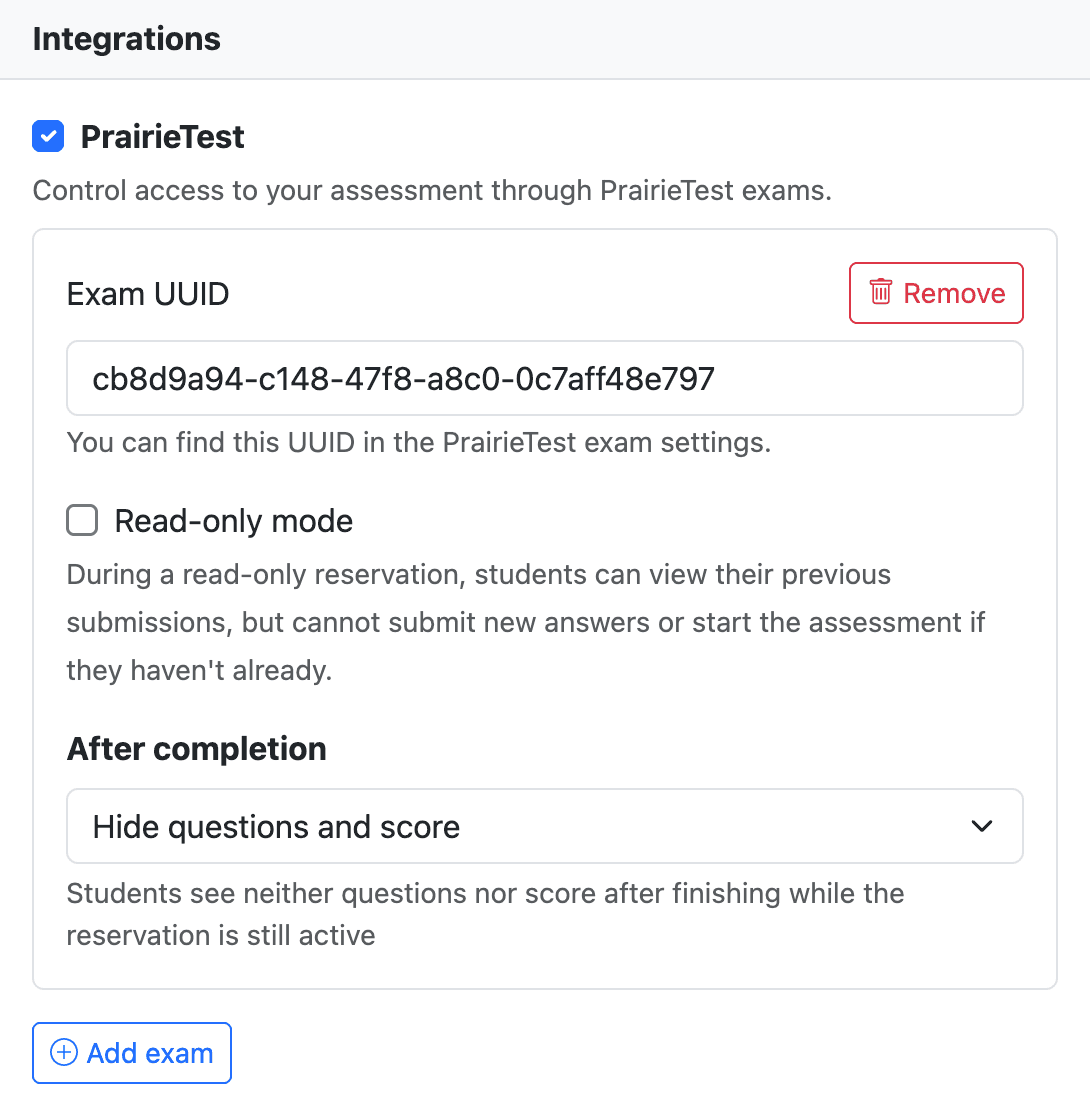
In addition to establishing the link, the new access control system supports a few PrairieTest-specific settings:
- An exam link can now be marked as read-only. This is useful for courses that want students to review previous submissions in a controlled setting without starting new work or submitting new answers.
- It's now easier to configure what students see during their reservation after they've completed their exam: questions and score, score only, or neither.
Student labels
Student labels are a first-party way to organize students within a course instance. They appear as colored badges in the student roster, gradebook, and student detail pages, and they are not visible to students. You can use them for sections, accommodations, TA assignments, lab groups, or any other grouping that should be easy for staff to find and reuse.
Labels can be created and assigned from the course instance Students page. You can paste a list of UIDs when creating or editing a label, or select students from the roster and apply labels in bulk. Once a label exists, assessment access can target the label instead of a one-off list of students.
Overrides for student labels and individual students
Assessment access will often need exceptions:
- Students with accessibility accommodations may need extra time.
- Different sections may need different deadlines.
- A student may need a deadline extension due to illness.
In the new editor, these are represented as Overrides, which change selected settings while inheriting the rest from the defaults. An override can apply to individual students or to student labels. Here's how they can be used to support the above scenarios:
- If the default time limit is 60 minutes, an override for a "150% time" student label can increase the time limit to 90 minutes.
- An override for the "Section A" label can set a due date of June 10th, and an override for "Section B" can set a due date of June 12th.
- If the default due date is July 10th, an override for an individual student can set the due date to July 15th.
Overrides stack, and individual-student overrides take precedence over student-label overrides. For example, a student with both a "150% time" label and a section-specific deadline can inherit both changes, while an individual due-date extension can still take priority for that student.
Override rule bodies are stored under accessControl in infoAssessment.json, which makes deadlines, time limits, and other settings easy to review alongside the rest of an assessment. Student-label overrides list the label names they target. Individual-student overrides keep a stable rule identifier and the rule body in JSON, while the selected-student mapping stays in PrairieLearn so student identities and one-off assignment details are not written into the course repository.
Migrating from allowAccess
While legacy allowAccess rules continue to work, we think most instructors will find the new system significantly easier to use. When you're ready to switch, you have a few options:
- When copying a course instance, PrairieLearn will prompt you to convert compatible assessment-level legacy rules to the new format.
- You can migrate individual assessments from their "Access" tab by clicking "Migrate to modern format". You can preview the resulting configuration and review any warnings or incompatibilities before confirming.
Because the legacy system could express some highly customized access patterns, some niche configurations can't be represented directly in the new timeline model. PrairieLearn will warn you during migration when this is the case. Those assessments can stay on legacy access control until you're ready to redesign the access pattern.
Access rules using the uids array don't migrate automatically because the student-to-rule mapping is managed in PrairieLearn rather than in course content. After migrating, you can manually add appropriate overrides for specific students or student labels.
JSON is still there when you need it
The new UI on the "Access" tab makes it easy to configure assessment access. However, the file-backed parts of the configuration are still available through the new accessControl property in infoAssessment.json files, which supports advanced use cases like programmatic creation or editing of assessments. Defaults, student-label overrides, and the rule bodies for student-specific overrides all live there; selected students for student-specific overrides are managed through the UI. The JSON format is described in the access control documentation.
Get started today
The redesigned assessment access controls are available now in PrairieLearn! To get started, open an existing assessment and click on the Access tab to explore the new editor and migrate your existing access rules at your own pace. The access control documentation has been updated with in-depth descriptions of all the new functionality. Reach out on Slack if you have questions or feedback!