Linting into 'The Pit of Success'
Welcome to our first blog post! Over the next couple months, we are hoping to post feature deep-dives, technical challenges and solutions (like this article), and more -- stay tuned!
If you want to be notified when a blog post is released, we will be posting these on our LinkedIn. Follow us there to stay up to date!
In the past couple of months, PrairieLearn has started enforcing a lot more stylistic and logical rules on our code. As a startup with effectively 3 full-time developers (Nathan, Myles, and I), this has greatly increased our ability to ship code, and unblock some bottlenecks.
We have spent a lot of time guiding PRs towards this "Pit of Success" and I wanted to share some of the improvements we made. We have since been able to ship code with a lot less "nits" which has saved us a lot of review cycles (and time!) 🕐
Background
When I started working at PrairieLearn a couple of months ago after graduating from University of Illinois, I was in for a rude awakening about my code. I was neglecting basic accessibility checks, and my code was (is?) littered with logic and rendering bugs. In a large company, this is fine -- you have lots of engineers to do QA, review your code, and pair program. However, we want to ship quickly, without breaking questions and courses that students are expecting to work with zero downtime.
From a code-review perspective, I was generating way more code than could be reviewed in a reasonable span of time.
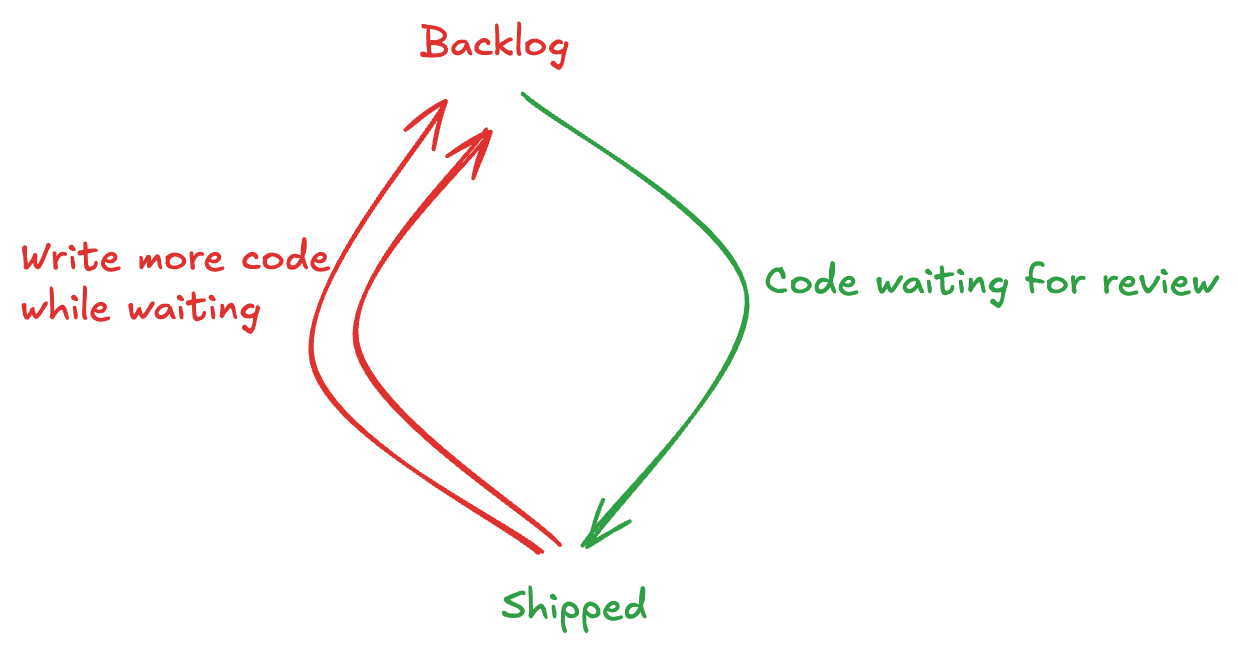
Whenever you are doing development, you are either review bottlenecked, or code bottlenecked. Being review bottlenecked is the worst -- it lets code pile up, leading to frequent merge conflicts and a very cluttered PR page. We were able to transition away from Nathan reviewing everything to a shared review workload, but still, a lot of time was spent double-checking repetitive or easy-to-make mistakes.
Clearly, we wanted a faster, more reliable way to get PRs merged and shift work back onto authors and off the reviewer.
Tooling
To accomplish this, we have spent a couple months beefing up tooling surrounding every aspect of PrairieLearn. It is getting hard to fail without knowing about it!
Python
Python is a picture-perfect example of a dynamically-typed language -- it can crash for tons of reasons that are entirely non-obvious. I could go on a whole tangent about how insane Python is, but it would take too long.
We spent a lot of time enabling the full config of ruff, spanning at least 33 PRs by my count.
We now require docstrings for all our code, and were able to fully autogenerate
documentation
using mkdocstrings.
We enabled a variety of stricter pyright settings, an effort that spans at least 15 PRs. We have our eye on pyrefly and ty.
Questions and elements
PrairieLearn essentially maintains a custom templating system -- a combination of Python and Mustache, using a custom state machine for questions. This is a core piece of our platform, and dates back over 10 years! This system has a couple of drawbacks, one of which is a lack of standardized tooling for our exact setup.
To fix this, I created a question testing and accessibility suite that runs across all our
questions in the example course. It renders all the questions with correct and incorrect inputs given,
and checks for issues in the question as well as accessibility violations. We use html-validate for static accessibility testing.
To do this, I fixed up a somewhat-hidden feature of PrairieLearn, the ability to auto-test questions and fixed up their implementations for our core element set. Then, we made a variety of accessibility improvements that could only be checked with the rendered HTML. As PrairieLearn develops a larger set of examples and elements, this will hit code paths on every deploy for elements that can help uncover regressions in the future.
At compile/development time, we are now using html-eslint to check formatting and tag issues statically via ESLint.
This was something that was very tricky due to our usage of Mustache, so kudos to the maintainer (@yeonjuan) who had built in support for template engines,
and was able to implement a variety of feature requests and bug fixes I made.
SQL
We are now linting our SQL files with sqlfluff. I was able to upstream 4 PRs to get this tool working for us.
We are also linting our migrations to ensure zero-downtime operations with Squawk. This was something easy to mess up and we were able to find operations that we thought were zero-downtime, but could actually block writes for substantial periods of time.
We are early adopters of postgres-language-server. As far as I am aware, this is one of the first projects
attempting to do something like this -- investing in improving tooling for SQL itself, and not a type-safe wrapper around SQL, which often have massive issues.
The maintainers there were able to provide a variety of bug fixes and enhancements
to get this to work for us, including $named_parameter_support and schema globs. This also enables basic typechecking of our code.
Model functions
PrairieLearn doesn't use an ORM for SQL, instead opting for Zod schemas and model functions alongside our codebase. We added tests ensuring that our model columns always line up with our database columns. We also finished typing all our SQL accesses. This was a multi-month effort, and involved a variety of type fixes (and bugs caused) to guarantee that we always validate data that comes out of our database.
JSON schemas
PrairieLearn uses JSONSchema for validating all of our configuration files. This is another core piece of PrairieLearn, which is configuration
that instructors can commit and edit as text rather than in a GUI. We are such big fans of Zod, that we rewrote our original JSON Schemas with Zod using zod-to-json-schema.
With the Zod 4 release, it seemed like this was the right call, as we will soon be able to do this natively.
We now auto-generate human-readable documentation for our JSON Schemas with jsonschema2md.
To allow for this, I finished implementing the full property list of JSONSchema and added support for <details> blocks for objects.
Using Zod has let us reuse these definitions across our TypeScript codebase, which has been incredibly useful.
Typescript
We were able to finish converting all our code from JavaScript to TypeScript.
Some of this code is absolutely ancient stuff -- originally using ejs templates that survived various evolutions of PrairieLearn.
I am so glad to not work with JavaScript again for a while -- once you go typed, the land of the untyped is scary.
We are still in the process of progressively making our TypeScript configurations stricter.
ESLint
We heavily beefed up our setup, pulling in projects like:
@html-eslint/eslint-plugin(Linting contents of ourhtmltagged templates)@eslint-react/eslint-plugin(Upstreamed a migration guide and new rule)@stylistic/eslint-plugineslint-plugin-jsdoceslint-plugin-jsx-a11y-x(Fun drama here with node 4+ polyfills)eslint-plugin-react-hooks+eslint-plugin-react-you-might-not-need-an-effect(Reported 2 bugs)eslint-plugin-unicorn
This new setup has been able to flag and auto-fix a variety of code patterns, and ensure consistency across our code base.
We are slowly improving type safety with more lint rules, like our recent push for no-unnecessary-condition.
Testing
We migrated away from Mocha to Vitest. There is a reason that it consistently tops charts -- it has an excellent VSCode extension, and is extremely extensible (more on this in the CI section).
CI
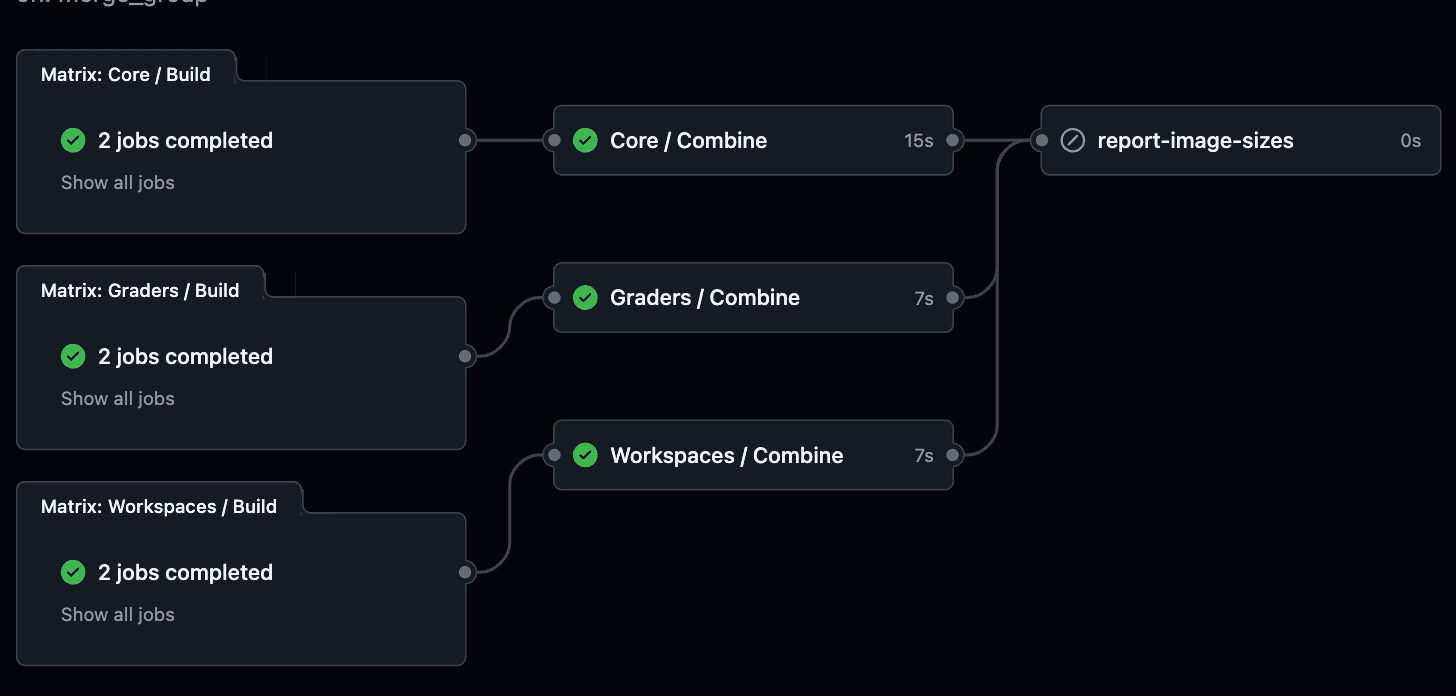
All these new lints and rules meant that we needed to rethink our CI setup to be faster. We were able to get down to a 7 minute full CI check, down from 12 minutes. The time to last actionable feedback (tests) is only 4 minutes (the 7-minute check is a full image build + question execution smoke test which should typically never fail) -- this makes it much easier to iterate quickly. The time to first feedback (lints) is under 2 minutes no matter what you are working on.
We made a variety of performance improvements to pull this off including:
- Caching Turborepo builds
- Using uv instead of plain pip for installs
- Caching our Prettier and ESLint builds (and getting an RFC accepted in Prettier related to this)
- Parallelizing our CI checks into 3 chunks that can all run in < 2 minutes
- Sharding our TypeScript tests. We run this across 4 workers, and were able to take advantage of Vitest's blob reporter. Nathan fixed their Github Actions reporter so we can report these issues on GitHub diffs.
- Using a matrix build for our images. We are taking advantage of registry caches for builds that are consistently under 4 minutes (dominated by yarn install time).
Misc. linters
We added a variety of specialty linters, such as:
- Github Actions linting with actionlint
- Markdown linting with markdownlint
- Dockerfile linting with hadolint
- Script linting with shellcheck
- Linting our changesets and d2 diagrams.
Human linters
- We have a new PR template with a checklist
- We auto-tag all our PRs based on area of code touched and keywords in the title
- We categorized and retagged all our issues and added issue templates
- We auto-review PRs with CodeRabbit which has caught subtle logic bugs and helped to build understanding of the PR.
Why?
Most developers would agree that for most projects, this is an impractical amount of developer tooling to set up -- just write the code. The reason we invested so heavily is due to a combination of factors.
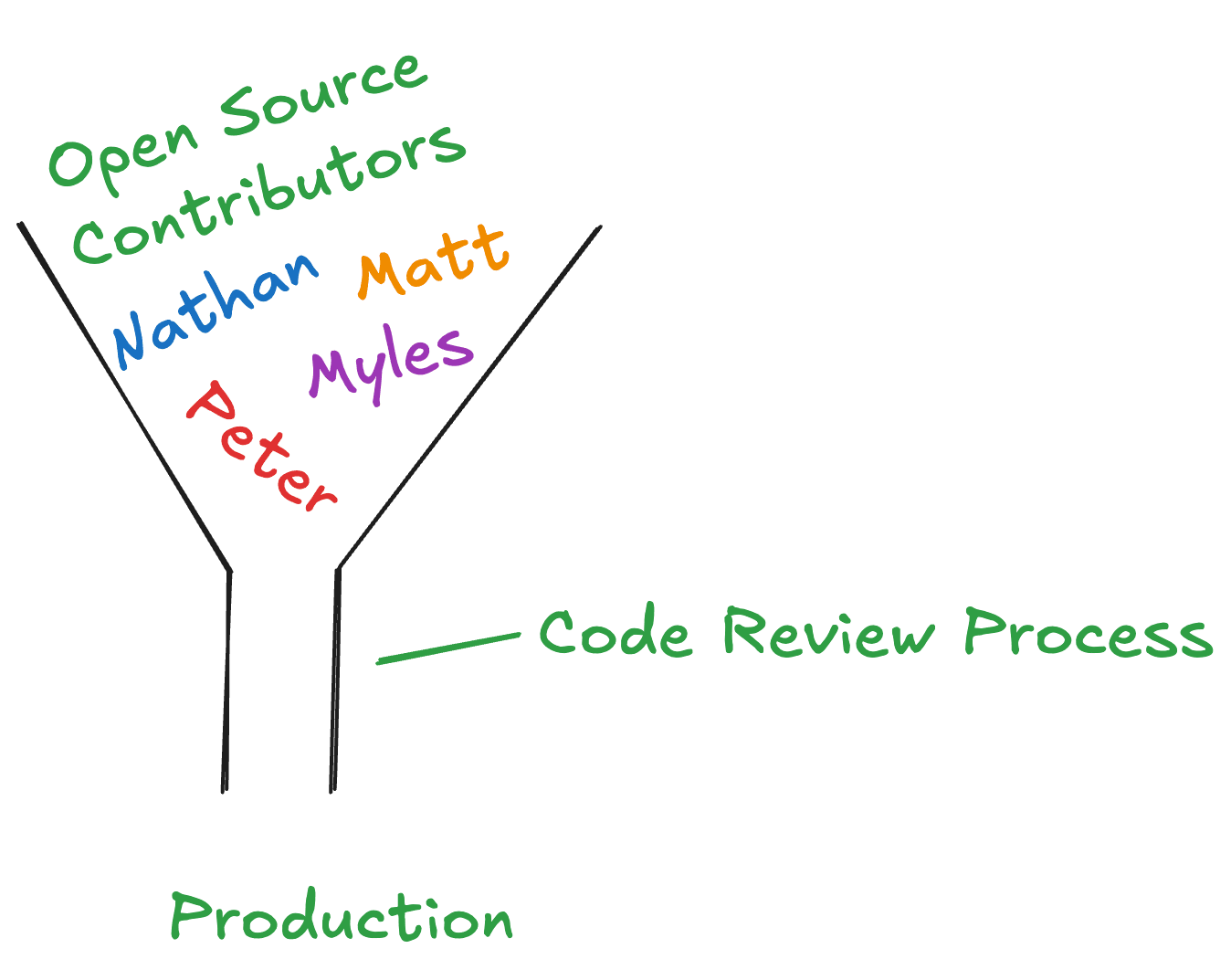
- We were so heavily review-bottlenecked. We were getting to a point where it was difficult for Nathan to write code, because he had to review so much! I also had extra time to upstream and experiment with various linters.
-
I am not well-versed in best practices. As a junior developer, there are still many takeaways and lessons worth enforcing that I am not thinking about, that a more senior developer would catch. Discussing various lint rules is actually a good way to agree on certain code styles and what we care about from a code-quality perspective.
-
AI is the ultimate junior developer. We are heavily integrating Claude Code and Cursor into our workflows. These are coding agents that can act on lint and build failures and self-correct code it is writing. Adding additional guardrails alongside a
agents.mdfile leads to some great code-quality improvements for these agents. -
We have a rotating window of undergraduates and graduate students that contribute to PrairieLearn. We can now spend less time worrying about code quality nits from these contributors, and focus more on actual functionality. Codifying lint and style rules helps enforce code quality and speed up understanding of how to write code for PrairieLearn. We also invested into our developer documentation for helping get these contributors up to speed.
-
We are an open-source first company. Being an open-source company, we are in the unique position to contribute time to these tools without worrying about maintaining an in-house fork with extra features that can't be shared with the public.
I believe that with the explosive usage of AI-assisted coding, linting and typechecking are becoming more important than ever.
Conclusion
We are now shipping code at 🚀🚀🚀🚀 blazing fast speeds 🚀🚀🚀🚀 so we can bring a variety of key features to all our PrairieLearn users!
The "pit of success"
The name of this post is a riff on the excellent blog post "Falling Into The Pit of Success" by Jeff Atwood.
The main takeaway from this post is:
I've often said that a well-designed system makes it easy to do the right things and annoying (but not impossible) to do the wrong things.
Or in other words, if mistakes are being made, it is too easy to make a mistake. I mean, it's 2025, we have AI-powered Google Glass, but we aren't warning the developer if their code is going to crash, or if their migration is going to crash production?
I also recommend checking out "The Grug Brained Developer", which talks more about the developer experience. In particular, the "Tools", "Type Systems", and "Expression Complexity" sections are all highly relevant to this post.
Takeaways
Some of the main learnings I have from this experience are:
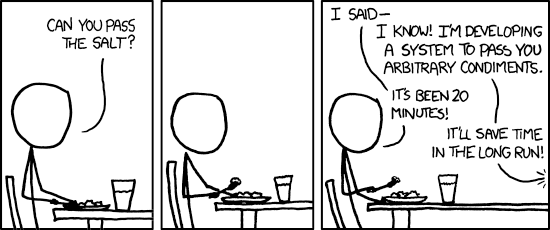
- If you see a similar mistake being made over and over, it is easy to quickly fix it every time, but these mistakes add up. It may be worth the time to develop a more general solution to the problem.
Source: https://xkcd.com/1205
- If you are in a position to upstream fixes/issues to tools you get a lot of value from (as we are at PrairieLearn), do it!
- Tooling can uncover a lot of strange code in your codebase. It is sometimes necessary to exclude it from linting. Any refactor has the potential to break working code!
Thanks for reading! ❤️
Peter Stenger